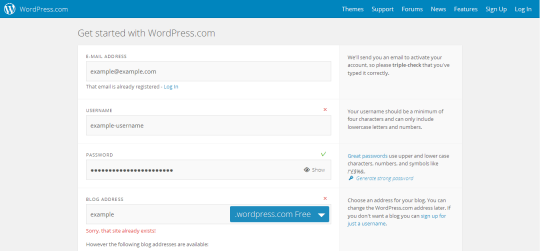
You need a WordPress.com blog, simply follow the steps to select your username and confirm your account via email.
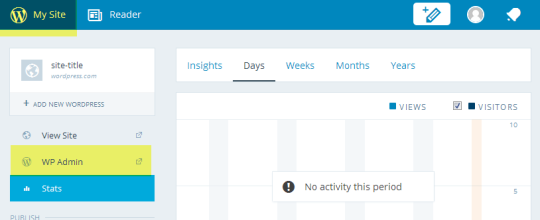
2. Open WordPress Admin
Click on My Site
Select the WP Admin you wish to import into
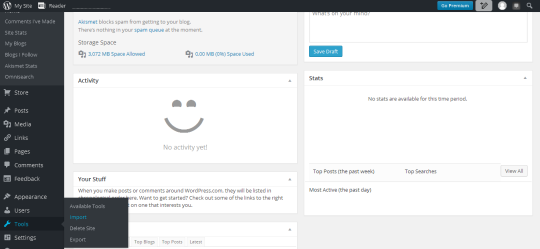
3. Visit the import tools page
In the sidebar menu select ‘tools’ and then ‘import’.
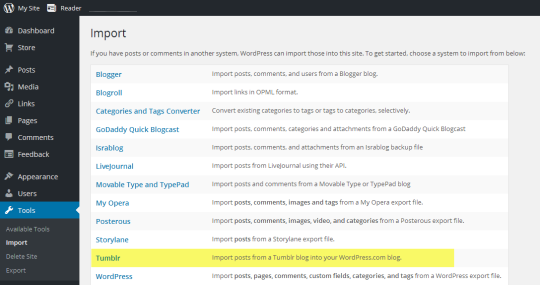
4. Select import from Tumblr
5. Allow Tumblr access
Click the ‘Connect to Tumblr to begin’ button. You may need to log into Tumblr if you haven’t already. Be sure to allow access to WordPress.com
6. Start the import!
Once authenticated you can select your Tumblr blog from the list of your blogs and click on ‘Import this blog’.
And you’re done, WordPress.com takes care of the rest and will create a copy of your posts onto your WordPress.com blog.
I see a lot of people sharing this as a backup tip, but it comes with a caveat. Unless you upgrade to a paid plan, there is a 3.0 GB upload limit on WordPress which is very easy to hit, and after which your images and media will not be backed up. The posts they’re in will appear as backed up and your text will be preserved, with the media content simply linked externally back to the original tumblr locations. This of course means if the original posts get deleted, these will be dead links – so not much of a backup. You also cannot upload mp3, m4a, wav, or ogg files without paying.
Another thing to note is that WordPress backs up the tags on your posts, but sorts them alphabetically. So if you, like many people, wrote “tag novels” and similar commentary, that will all be scrambled into nonsense.



 tumblr backup